(article updated after the post)
Fatwire Content Server 7.6 is finally available for direct download from Oracle. You can find it on http://edelivery.oracle.com . You need to login but you can get an account just registering for free. Once accessed the site you have a huge list of options to choose with, but Fatwire is there.
Here:
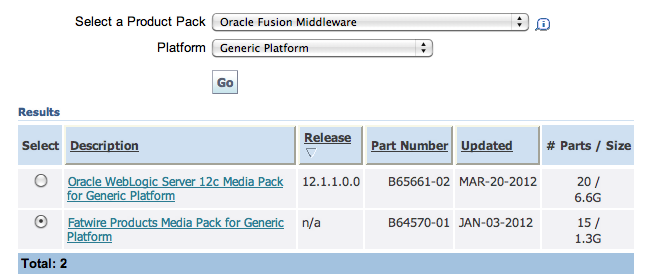
You have to choose Oracle Fusion Middleware then Generic Platform. Then you wil get a long list of Fatwire Products; there are 15 of them including Community and Mobility Server, Analytics and Gadget Server.
The good news is that they are the real products. The great news is that now ContentServer is without the license check, so you do not need to get a license from Fatwire to install it. Legally, if you are an Oracle Partner, you can use the products for Development.
But after those good news, there is a bad news. Disappointing enough, there is not the Jump Start Kit in this list. It is available from the support however.
You may already know that Jump Start Kit is a version of Fatwire pretty easy to install, that can run in your machine without a database. Actually runs with a database but it uses the embedded embedded Hypersonic SQL Database. HSQLDB is an in-memory database, certainly not good for enough production sites. However, because Fatwire is heavily cached application, actually using it with HSQLDB Fatwire runs fast and reliably enough for development purposes.
The whole database is also stored on a single text file, and it is easy to backup it: you just need to archive that file, while using Oracle you may need to take a database dump.
It is usually pretty inconvenient having to run in your machine a full Oracle instance for development. Even if you have a 4 Gb machine, Fatwire, Oracle and Eclipse running together in the same machine are... a bit slow (to use a moderate term). So HSQLDB is definitely my choice to get a local instance for development.
The rest of this post describes how to install the real Fatwire using HSQLDB like Jump Start Kit.
The interesting news is that is possible to install the real ContentServer 7.6 using HSQLDB instead of using the Jump Start Kit, although you may resort in using a small trick.
Please note that what follows is by no means an officially supported configuration. I have used however in large projects and it works pretty well.
I have never faced any major problem using HSQLDB instead of a real database as long as you use the same version that is used in the JumpStart.
I install the real Fatwire for development mostly because there are no hot fixes available for Jump Start Kit. So if you use your local Fatwire instance for development and another Fatwire for production, you may have to update the production instance without having the possibility to update your development instance.
Indeed having development and production instances out of sync can became a major problem, since the instances must match in version number for publishing.
Another problem is the configuration installation. Sometimes I need to configure Fatwire without Engage, while it is always installed with Engage in JumpStart Kit, with no (easy) way of getting rid of it. Also there are certain demos available in the full fatwire that are not in the JumpStart Kit.
Last but not least, the layout. I really hate the layout offered by JumpStartKit. My preference is to install both the fatwire and shared folder under the tomcat directory, and the database folder under the shared folder.
This way you can distribuite the whole thing (including the tomcat and the database) just zipping the tomcat folder. And you can take a backup of the system just zipping the shared folder, if you have the database inside the shared folder, as I usually do.
If you try to install Fatwire in your local machine using the provided installer downloaded from Oracle, r you will see that the installer offers as an installation option one of Oracle, SQL Server or DB2. So it looks like you are required to install it only with a full fledged database even, if you are installing only a development instance in your machine.
I have actually tried to install it using either Oracle XE and SQL Server Express, and it works. So you do not have to use the full Oracle instance, you can use a more lightweight version. However I have found you can actually install the full version with HSQLDB!
I have done some tests, and I was fully successful using HSQLDB 1.8.0 (the version actually used by the JumpStart) but I had some problems using version 1.8.1 . I have not tried newer version like 2.x. You will see that there is MySQL as an option but so far I was not successful, I have no idea which MySQL version is actually supported.
Here is a step by step guide how to install the full Fatwire using Tomcat and HSQLDB.
1. Download and configure a Tomcat 6.0.x from the Apache website.
2. Download HSQLDB 1.8.0 from SourceForge
3. Place hsqldb.jar in the folder lib of the Apache Directory
4. Edit the file conf/server.xml and add this configuration (change /path/to/data to the folder where you will place the database)
<Context path="/cs" docBase="cs"
  reloadable="true"
  crossContext="true">
<Resource name="csDataSource"
  auth="Container" type="javax.sql.DataSource"
  maxActive="50" maxIdle="10" username="sa" password=""
  driverClassName="org.hsqldb.jdbcDriver"
  url="jdbc:hsqldb:/path/to/data/csDB"/>
</Context>
4. Start the installation of ContentServer download, unzipping it, running csInstall.sh or csInstall.bat. Now answer to all the questions until you get to the database choice pulldown. Pick whatever you want (Oracle is fine), and go on.
5. Go on with the installation until you get reach the point where the installer asks you to start the application server, as in the following image:
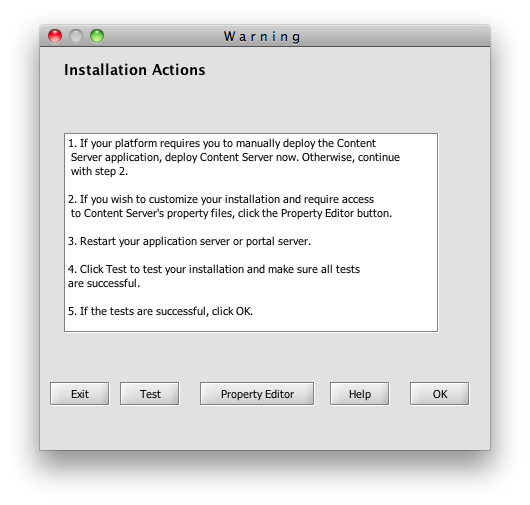
6. Now it comes the trick: click on the button Property Editor, wait for the property editor to comes up, select Options then Change Database, and you will see the following screen showing up as in the following image:
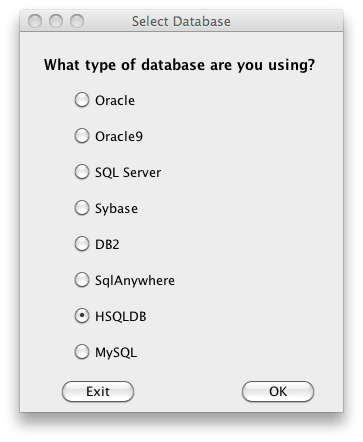
Here you can change the database. Please note that this will only change the type of database used by Fatwire, but you have to manually configure the datasource csDataSource in the application server. That is what you did in step 4, so Fatwire should work.
7. Now you can save the configuration file, start the application server and complete the installation. If you have done it correctly now Fatwire should be up and running using HSQLDB.
So far, the technique described works on Windows and Linux. If you try to run the installer on a Mac however, you will incur in the surprise that you cannot select an application server. It looks like the configuration system does not detect a compatible application server on a OSX platform.
However, it is all just Java, Tomcat and HSQLDB works reliably on the Mac Java Virtual Machine and there is no reason because you should not run it on a Mac. It actually works.
The limitation of the installer is annoying but however it is easily overcome: just pretend on the Mac you are running on linux.
That is easy enough: edit the script csInstall.sh and add into the last line, just after the command $JAVA:
-Dos.name=Linux
That's it. This way the installer thinks you are on Linux and will let you to choose Tomcat as an application server. I have completed the installation on a Mac a number of times and it works.